ip
Duke Chat bot User Guide
Introduction
Duke chat bot is for people in need to manage their daily tasks via CLI.
Quick Start
- Ensure you have
Java 11or above installed in your Computer. - Download latest
duke.jar. - Double-click on the
duke.jarto start the application. - Exit the app by typing in “bye”.
Features
- Add a todo/event/deadline task
- View the list of tasks
- Mark certain tasks as completed
- Delete a task
- Find a task by keyword
- Get reminder on upcoming dues
Usage
Todo - Add a todo task
Store a todo task which does not have time constraint.
Format: todo TASK_NAME
Example of usage:
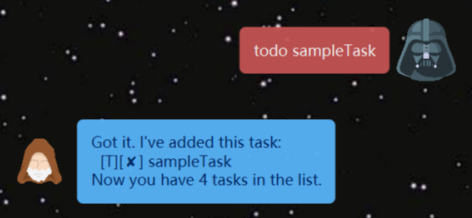
todo sampleTaskcreates thesampleTaskin the task list.
Event - Add an event task
Store an event task which needs to be done at a scheduled time.
Format: event TASK_NAME /at SCHEDULED_TIME
SCHEDULED_TIMEfollows the format ‘YYYY-MM-DD’.
Example of usage:
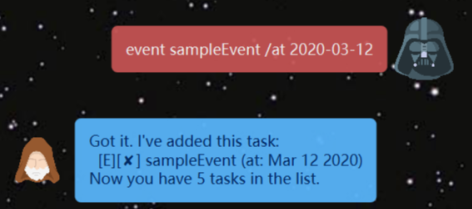
even sampleEvent /at 2020-03-12creates thesampleEventin the task list.- The
sampleEventis to be done at March 12, 2020.
Deadline - Add a deadline task
Store a deadline task which needs to be done before a scheduled time.
Format: deadline TASK_NAME /by SCHEDULED_TIME
SCHEDULED_TIMEfollows the format ‘YYYY-MM-DD’.
Example of usage:
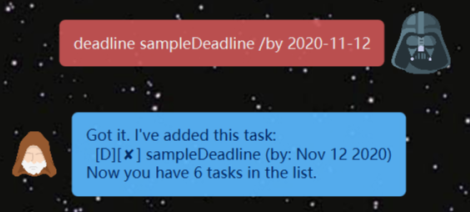
deadline sampleDeadline /by 2020-11-12creates thesampleDeadlinein the task list.- The
sampleDeadlineis to be done before Nov 12, 2020.
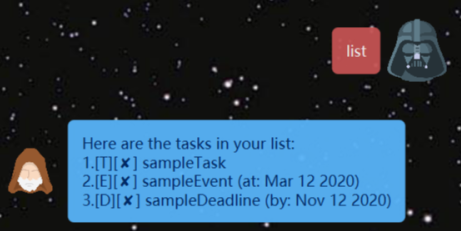
List - Display the list of tasks
Generates the entire list of tasks stored in the app.
Format: list
- The displayed string is of the form
[TASK_TYPE][COMPLETION_INDICATOR]TASK_NAME ([TASK_SCHEDULE]). TASK_TYPEcan beT(Todo) /E(Event) /D(Deadline).COMPLETION_INDICATORshows whether the task has been completed, a✓means done, a✘means not done.TASK_SCHEDULEis optional.
Example of usage:
listreturns all tasks’ information presented nicely.
Done - Complete a task
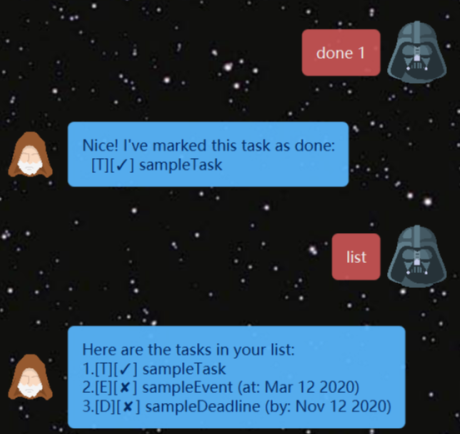
Mark a task in the list as completed.
Format: done TASK_INDEX
TASK_INDEXis an integer between 1 and length of list.
Example of usage:
done 1updates the status of the first task as “done”, represented as✓.
Delete - Delete a task
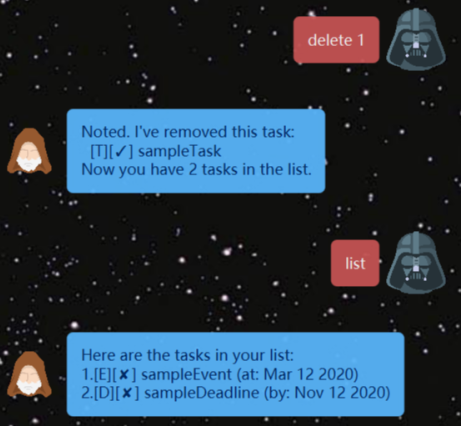
Delete a task in the list by its index.
Format: delete TASK_INDEX
TASK_INDEXis an integer between 1 and length of list.
Example of usage:
delete 1delete the first task from the list.
Find - Search for relevant tasks
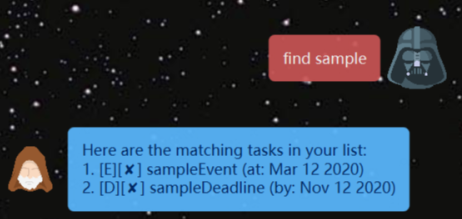
Find the tasks containing certain keywords specified by the user.
Format: find KEYWORD
KEYWORDis limited to 1 word.
Example of usage:
find samplereturns all tasks whose name contain the word'sample'.- Here the outputs are
sampleEventandsampleDeadline.
Reminder - Get notified of upcoming due
Remind the use the upcoming events/deadlines sorted by their schedule.
Format: remind TASK_NUMBER
TASK_NUMBERis amount of upcoming tasks the user wants to know.
Example of usage:
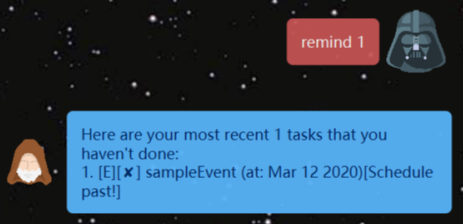
remind 1returns the earliest 1 task the user hasn’t completed.- If the task’s scheduled time has past, the returned task will also indicate it.
- Here the earliest task is
sampleEvet, which should be done at March 12, 2020. The output also shows[Schedule past!]to remind user this event has past and not been done.